NGINX Intermediate Config (Part 2)
URL Manipulation — Mastering Redirects and Rewrites
Welcome to Chapter 2 of our Intermediate Config module! In our last guide, we looked at how to split a single NGINX web server instance into multiple independent virtual hosts. But as production environments grow, web architectures change.
Domains get migrated, folders get reorganized, and security mandates require us to force unencrypted HTTP sessions onto secure HTTPS channels. To manage these shifts seamlessly without breaking user bookmarks or losing SEO ranking value, an engineer must master NGINX's two primary traffic-shaping mechanisms: Redirects (return) and Rewrites (rewrite).
In this guide, we will break down the structural differences between them, look at production-grade config templates, and review regular expressions to manipulate URIs on the fly.
1. Architectural Blueprint: Redirect vs. Rewrite
While both directives manipulate how requests are resolved, they operate at completely different stages of the client-server lifecycle.
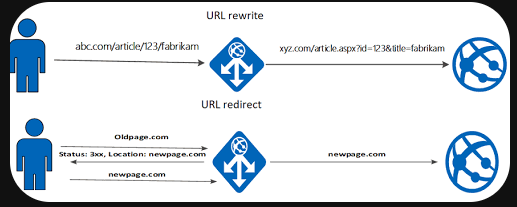
Redirect (
return): This is a client-side operation. When NGINX hits areturnblock, it immediately halts processing and sends an HTTP status code (like301 Moved Permanently) back to the browser. The browser sees this code, updates its address bar to show the new URL, and initiates a brand new connection to the updated location.Rewrite (
rewrite): This is primarily a server-side operation. NGINX modifies the requested URI internally using regular expressions before passing it down to file checks or upstream proxy locations. The visitor's browser address bar stays exactly the same, completely hiding your internal directory renames or backend application structures.
2. Real-World Routing via the return Directive
The return directive is highly efficient because it stops processing immediately once matched, saving CPU cycles. Here are the three most common production configurations.
Use Case A: Entire Domain Migration
When shifting branding from an old domain over to a clean destination, use a permanent redirect to pass your search engine optimization (SEO) history along:
server {
    listen       80;
    server_name  honda.cars.com;

    # Send all requests permanently to the new domain structure
    return 301 https://cars.honda.com$request_uri;
}
$request_uri: This built-in variable captures the exact sub-path and parameters the user typed (e.g.,/civic?color=red). This ensures that visitors land on the exact matching page of the new site rather than getting dumped on the homepage.
Use Case B: Forcing HTTP to HTTPS
Security baselines require all production applications to run over TLS/SSL. Here is how you can intercept unencrypted port 80 traffic and upgrade it:
server {
    listen       80;
    server_name  diner.com;

    # Force connection upgrade
    return 301 https://\(host\)request_uri;
}

server {
    listen       443 ssl;
    server_name  diner.com;

    ssl_certificate     /etc/ssl/certs/diner.com.pem;
    ssl_certificate_key /etc/ssl/certs/diner.com-key.pem;
    root  /var/www/diner;
}
Use Case C: Single-Page Redirects
If you are deprecating or updating a single high-traffic landing page, you can nest the return directive straight inside a specific location block:
location /civic-type-r {
    return 301 https://cars.honda.com/type-r;
}
3. Mastering the rewrite Directive with Regular Expressions
When you need to alter incoming paths dynamically without changing what appears in the user's browser, you need the rewrite directive. It uses standard Regular Expressions (regex) to match and capture path fragments.
Quick Regex Reference Cheat Sheet
Regex Token | Evaluation Purpose | Example Layout |
| Indicates the strict start of a string path. |
|
| Indicates the strict end of a string path. |
|
| Wildcard: Matches any single character token. |
|
| Matches zero or more repetitions of the previous token. |
|
| Capture Group: Snatches everything and stores it in a temporary variable ( |
|
Production Scenario: Folder Renaming without Broken Links
Imagine your application asset folder was renamed on disk from /images to /pics. You want old bookmarked image links to keep working without throwing a 404 error.
server {
    listen 80;
    server_name example.com;
    root /var/www/html;

    location / {
        # Capture anything following /images/ and inject it into $1
        rewrite ^/images/(.*)\( /pics/\)1 permanent;

        try_files \(uri \)uri/ =404;
    }
}
Breaking Down the Mechanics:
The regex pattern
^/images/(.*)$instructs NGINX to look for paths starting with/images/.The parenthesis
(.*)act as a capture group, capturing the rest of the filename (e.g.,pic01.jpg).NGINX places that captured text value straight into a temporary system token named
$1.The destination parameter maps this token onto the new target path:
/pics/$1.The trailing
permanentflag commands NGINX to return an official HTTP 301 back to the browser, updating the client's search indexes automatically.
4. Common HTTP Routing Status Codes
When debugging your rewrite and redirect configurations, always keep your browser's Developer Tools network tab open to track response codes:
Code | Standard Core Meaning | Operational SRE Takeaway |
| OK | Request processed and delivered successfully. |
| Moved Permanently | Permanent redirect; transfers search engine ranking history. |
| Found | Temporary redirect; tells browsers not to cache the redirection. |
| Not Found | The requested path or file does not exist on disk. |
| Bad Gateway | NGINX is working fine, but the upstream backend application server crashed or timed out. |
5. 'last' flag V/S the 'break' flag
This part of NGINX configuration trips up almost everyone when they start writing intermediate routing rules.
Both last and break tell NGINX to stop executing any further rewrite lines below them in that block. The critical, structural difference is what NGINX does with the newly modified URI right afterward.
The Apartment Analogy
To build on our apartment building analogy from the previous chapter, imagine a visitor walks into a specific apartment (location block) with their paperwork (the requested URI). Inside that room, a rewrite rule alters their paperwork.
lasttells the visitor: "Your paperwork has completely changed. Please leave this room immediately, go back down to the building lobby, read the directory map on the wall from the very top, and find the new apartment that matches your updated paperwork."breaktells the visitor: "Your paperwork has changed, but stay right here in this room. We are going to finish processing your request using only the tools and files available inside this exact apartment."
Code Examples: Seeing the Behavior in Action
Let’s look at two scenarios to see how this affects your system's behavior.
Scenario 1: Using last (Restarting the Search)
server {
    listen 80;
    server_name example.com;
    root /var/www/html;

    location /old-downloads {
        # 1. Matches here first
        # 2. Changes URI to /v2-downloads/archive.zip
        # 3. Kicks request out to start matching locations from the top again
        rewrite ^/old-downloads/(.*)\( /v2-downloads/\)1 last;
    }

    location /v2-downloads {
        # 4. Request lands here safely because of the restart!
        try_files $uri =404;
    }
}
Because we used last, NGINX picks up the rewritten path (/v2-downloads/archive.zip), runs it through the location selection algorithm from scratch, matches the second location /v2-downloads block, and serves the file.
Scenario 2: Using break (Staying in Place)
server {
    listen 80;
    server_name example.com;
    root /var/www/html;

    location /old-downloads {
        # 1. Matches here first
        # 2. Changes URI to /v2-downloads/archive.zip
        # 3. Stops rewrites, but stays trapped in THIS location block
        rewrite ^/old-downloads/(.*)\( /v2-downloads/\)1 break;

        # 4. NGINX looks for: /var/www/html/old-downloads/v2-downloads/archive.zip
        try_files $uri =404;
    }

    location /v2-downloads {
        # NGINX never gets here!
        try_files $uri =404;
    }
}
Because we used break, NGINX refuses to look for a new location block. It attempts to serve the request using the root and try_files directives inside the current block. It combines the original location prefix with the new path, resulting in a broken file path check and a 404 error.
Quick Reference Summary
Architectural Behavior | last | break |
Stops further rewrites in current block? | Yes | Yes |
Triggers Location Re-evaluation? | Yes (Goes back to the lobby) | No (Stays in the room) |
Best Used For... | Public-facing URL changes where the destination needs to be evaluated by a different | Internal path corrections or asset lookups where the current block already points to the correct filesystem root. |